PWM
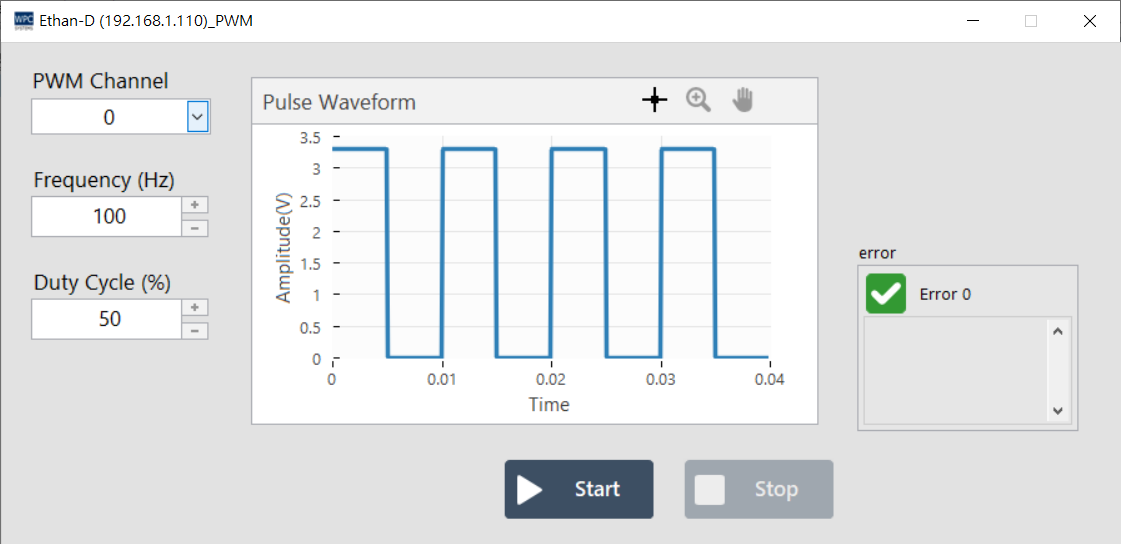
The PWM (Pulse Width Modulation) panel allows users to generate pulse width modulation signals. You can control the frequency and duty cycle (Duty Cycle) of the digital signal, applicable to applications such as motor control and LED dimming.
Supported Products and Channels
This function supports devices with PWM output capability. Please confirm the corresponding channel (Channel) number according to your device model:
| Product Name | Channel |
|---|---|
Ethan-D | 0~1 |
USB-DAQ-F1-AD | 0~1 |
USB-DAQ-F1-AOD | 0~1 |
USB-DAQ-F1-CD | 0~1 |
USB-DAQ-F1-D | 0~1 |
USB-DAQ-F1-DSNK | 0~1 |
USB-DAQ-F1-RD | 0~1 |
USB-DAQ-F1-TD | 0~1 |
caution
Note: The PWM function shares hardware resources with the Counter function and cannot be enabled on the same channel simultaneously.
Parameter Settings and Operation
Set the frequency and duty cycle of the PWM output, and control the output using the buttons below:
| Parameter/Button | Description |
|---|---|
| Frequency (Hz) | Set the frequency (Hz) of the PWM signal, which is the number of signal switches per second. |
| Duty Cycle (%) | Set the duty cycle (%), which is the proportion of time the signal is at high potential (On) within one complete cycle. |
| Start | Start generating and outputting PWM signals. |
| Stop | Stop outputting PWM signals. |