Step Drive
The WPC-EDrive-ST is a single-axis stepper motor integrated driver with a network interface. Through the Step Drive panel, you can set the driver current, resolution, perform motion tests, and vibration suppression functions.

Driver Setup
Set the stepper motor's running current (Run Current), holding current (Hold Current), and microstepping resolution (Microstepping).
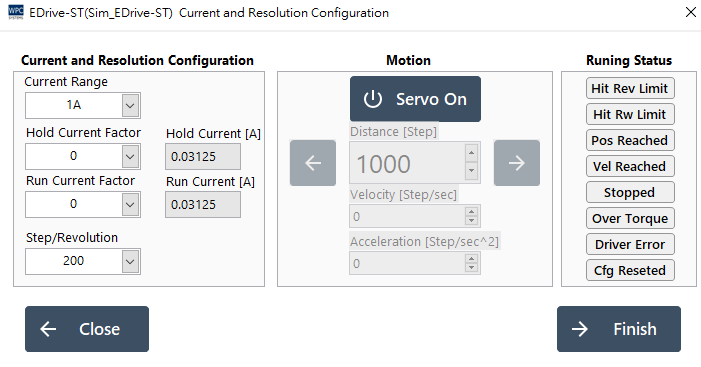
1. Current Setting Description
This driver supports multi-stage current settings. Please select the closest setting value according to your motor's rated current.
| Setting Level (Factor) | Current Range 1A (A) | Current Range 2A (A) | Current Range 3A (A) |
|---|---|---|---|
| 0 | 0.03125 | 0.0625 | 0.09375 |
| 1 | 0.0625 | 0.125 | 0.1875 |
| ⋮ | ⋮ | ⋮ | ⋮ |
| 20 | 0.65625 | 1.3125 | 1.96875 |
| ⋮ | ⋮ | ⋮ | ⋮ |
| 31 | 1.0 | 2.0 | 3.0 |
2. Resolution Setting Description
Select steps per revolution (Steps per Revolution).
| Step/Revolution | Description |
|---|---|
| 200 | Full step (1.8°/step) |
| 400 | Half step |
| ⋮ | ⋮ |
| 12800 | High-resolution microstepping |
| 51200 | Highest resolution |
3. Motion Control Testing
Provides basic jog and positioning test functions.
| Button/Parameter | Description |
|---|---|
| Servo on | Enable motor excitation. |
| ⬅ Reverse | Control the motor to move in the reverse direction. |
| ➡️ Forward | Control the motor to move in the forward direction. |
| Distance | Distance of each move (Step). |
| Velocity | Movement speed (Step/sec). |
| Acceleration | Acceleration (Step/sec²). |
4. Operation Status (Status)
| Status Indicator | Description |
|---|---|
| Hit Rev Limit | Reverse limit switch triggered. |
| Hit Fw Limit | Forward limit switch triggered. |
| Pos Reached | Target position reached. |
| Vel Reached | Set velocity reached. |
| Stopped | motor stopped. |
| Over Torque | Over-torque alarm. |
| Driver Error | Internal driver error. |
| Cfg Reseted | Parameters reset. |
Anti-Vibration Tuning
Stepper motors are prone to resonance and vibration when running at low speeds. Through the "Low-Speed Vibration Suppression" function, the smoothness can be significantly improved.
Step 1. Set Test Range
Set a safe back-and-forth movement interval.

- Press Servo on to excite.
- Turn the motor to the end point and press Set End Position.
- Turn the motor to the starting point and press Set Start Position.
Step 2. Adjust Anti-Vibration Parameters
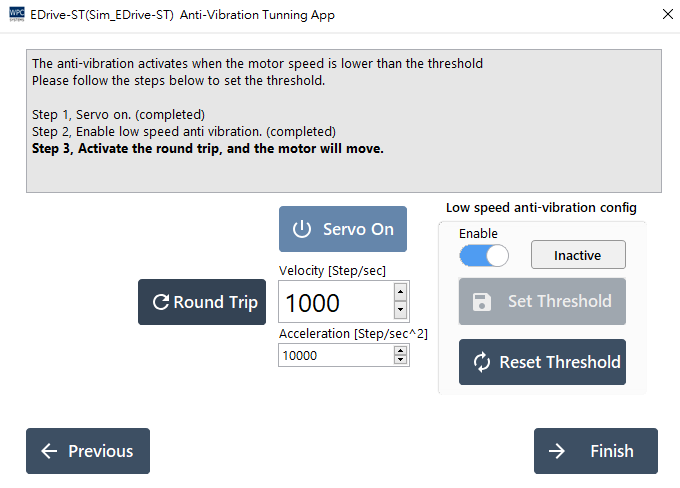
- Turn on Enable to enable the anti-vibration function.
- Press Round Trip to let the motor move back and forth automatically.
- Gradually increase the speed and observe if the motor starts to vibrate.
- After finding the critical speed where vibration occurs, press Set Threshold to set this speed as the action threshold for the suppression function.
- After completion, observe whether the operation becomes smooth.
File Configuration
EDrive-ST supports configuration file export and import functions, which are convenient for quickly copying parameters to other machines or for backup.
