AO
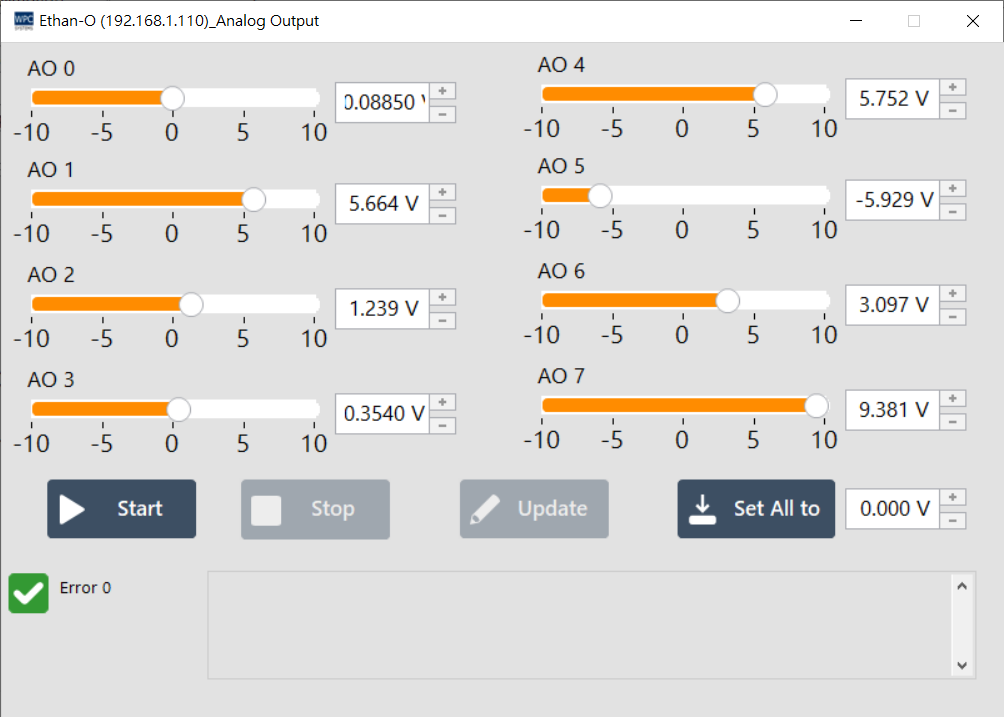
The AO (Analog Output) panel allows users to perform analog signal output control for voltage or current. Through this interface, you can manually set the output values for each channel or update multiple channels simultaneously.
Supported Products
This function only supports devices with Analog Output (AO) capability. Please confirm your device model and supported output range:
| Product Name | Output Specification Description |
|---|---|
Ethan-O | 8-channel voltage output (Range: +/-10V) |
USB-DAQ-F1-AOD | 8-channel voltage output (Range: +/-5V) |
Operation Description
1. Single Channel Value Setting
Directly adjust the value input box or slider for each channel (Channel) in the interface to set the target output voltage for that channel.
- Update: After entering the value, press the
Updatebutton next to the channel, and the device will immediately output the set voltage value.
2. Multi-channel Synchronization Setting (Set all to)
If you need to set all channels to the same value, please use the Set all to function at the top:
- Fill in the target voltage value in the
Set all toinput box. - Press the
Set all tobutton, and the values for all channels will be updated simultaneously.
3. Start and Stop Output
Use the control buttons below to start or stop the signal output function:
| Button | Function |
|---|---|
| Start | Start the AO function. The device will begin to output signals according to the set values. |
| Stop | Stop the AO function. After stopping, the device will maintain the last output voltage value or return to zero (depending on the device hardware settings). |