Flight Controller | ArduPilot & PX4 Supported
The flight controller is a state-of-the-art universal flight controller developed based on the Pixhawk Autopilot v6X standard. It adopts an STM32H753 double-precision floating-point FMU processor and an STM32F103 I/O coprocessor with independent buses and power supplies. Equipped with multiple IMUs featuring 6-axis inertial sensors, barometric pressure/temperature sensors, and a geomagnetic sensor, it is engineered for high reliability, flight safety, and extensive expansion capabilities. With an integrated 10/100M Ethernet Physical Layer (PHY), the flight controller can communicate directly with mission computers (companion computers), high-resolution mapping cameras, and other UxV payload systems at high speeds.
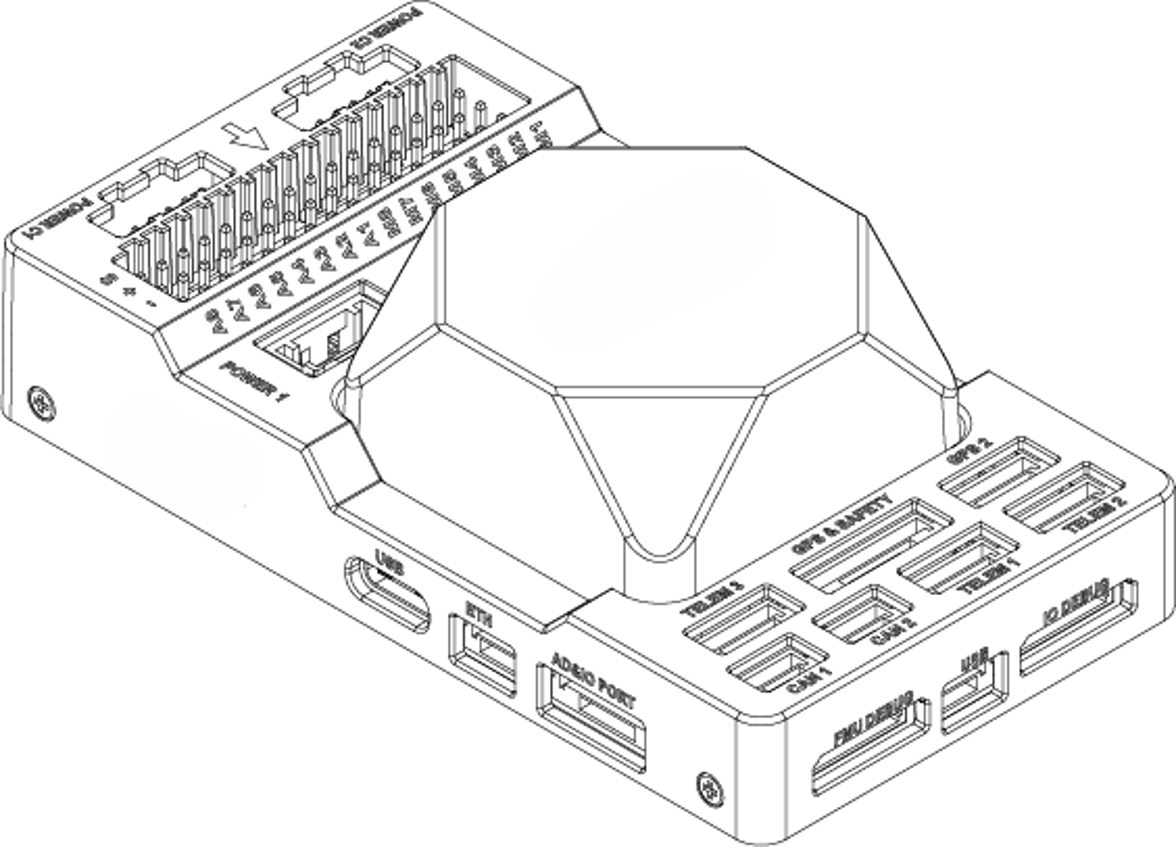
Product Information
Hardware Summary
| Item | Specification / Description |
|---|---|
| FMU Processor | STM32H753IIK (Arm® Cortex®-M7, 480 MHz) |
| IO Processor | STM32F103 (Arm® Cortex®-M3, 72 MHz) |
| Memory | 2 MB Flash memory, 1 MB RAM |
| Sensors | • Bosch BMI088 IMU sensor (vibration isolated) • TDK InvenSense ICM-42688-P IMU sensor ×2 (one vibration isolated) • TDK ICP-20100 barometric pressure and temperature sensor ×2 (one vibration isolated) • PNI RM3100 geomagnetic sensor (vibration isolated) |
| IO Interface | • 2× CAN Bus (CAN1 and CAN2) • 3× TELEM Port (TELEM1, TELEM2, and TELEM3) • 2× GPS Port (Safety switch / LED / Buzzer, and GPS2) • 1× PPM IN • 1× SBUS OUT • 2× USB Port (1× Type-C and 1× JST GH1.25) • 1× 10/100Base-T Ethernet Port • 1× DSM / SBUS RC • 1× UART4 • 1× AD&IO Port • 2× Debug Port (1× IO Debug and 1× FMU Debug) • 1× SPI6 Bus • 2× Power Input with I2C bus (Power 1 and Power 2) • 2× Power Input with CAN bus (Power C1 and Power C2) • 16× PWM Servo Output (A1–A8 from STM32H753 on FMU board; M1–M8 from STM32F103 on IO board) • 1× MicroSD Socket (Push-Pull, supports SD 4.1 & SDIO 4.0 in 1-bit default and 4-bit modes) |
| MicroSD Card | Not included in the package |
| Power Requirement | 4.6 V to 5.7 V |
| Current Ratings | • TELEM1 and GPS2 combined output current: 1.5 A (max) • All other ports combined output current: 1.5 A (max) |
| Operating Temperature | -40 °C to +55 °C |
| Storage Temperature | -40 °C to +70 °C |
| Operating Humidity | 5% to 95% (non-condensing) |
| Casing Material | ABS (carrier board), Diecast Aluminum Alloy (IMU cover) |
| Dimensions | 92.2 mm (L) × 51.2 mm (W) × 28.3 mm (H) |
| Weight | 77.6 g (carrier board with IMU) |
Pin Definition
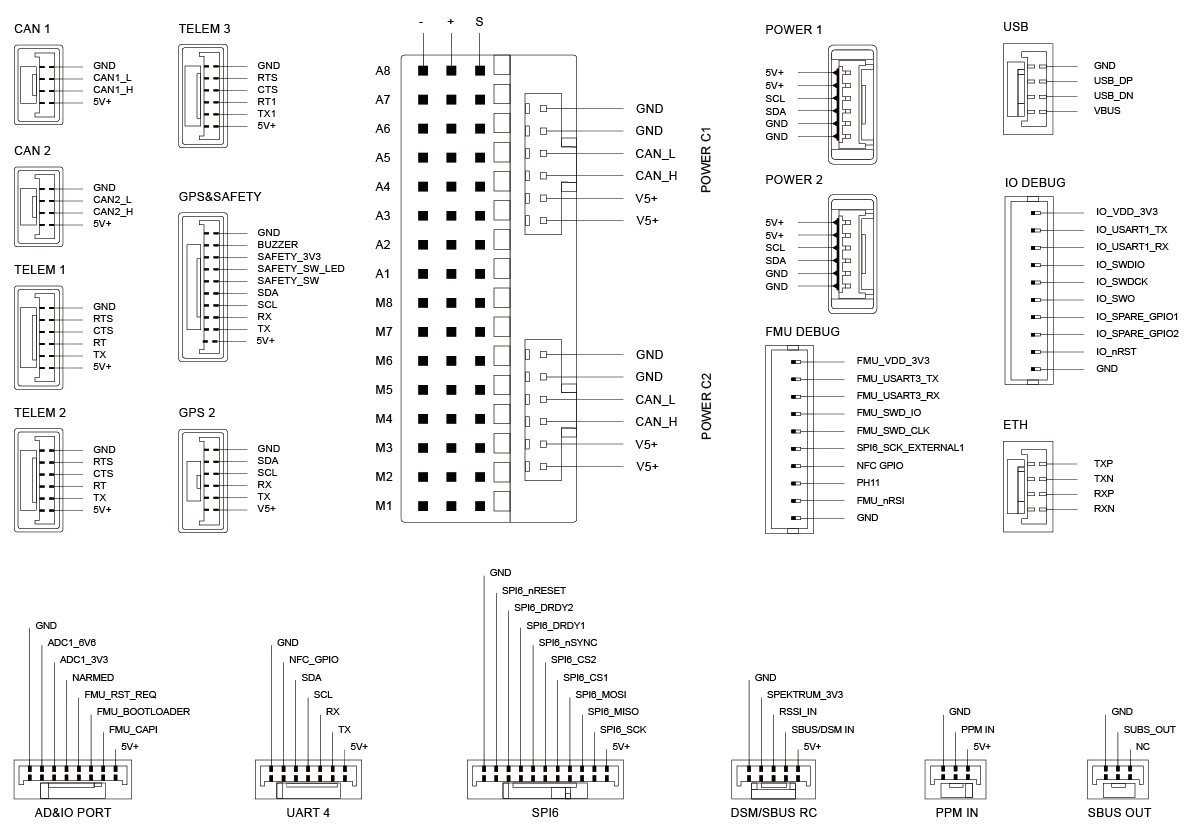
Wiring Overview
The diagram below illustrates the flight controller and its peripheral connections.
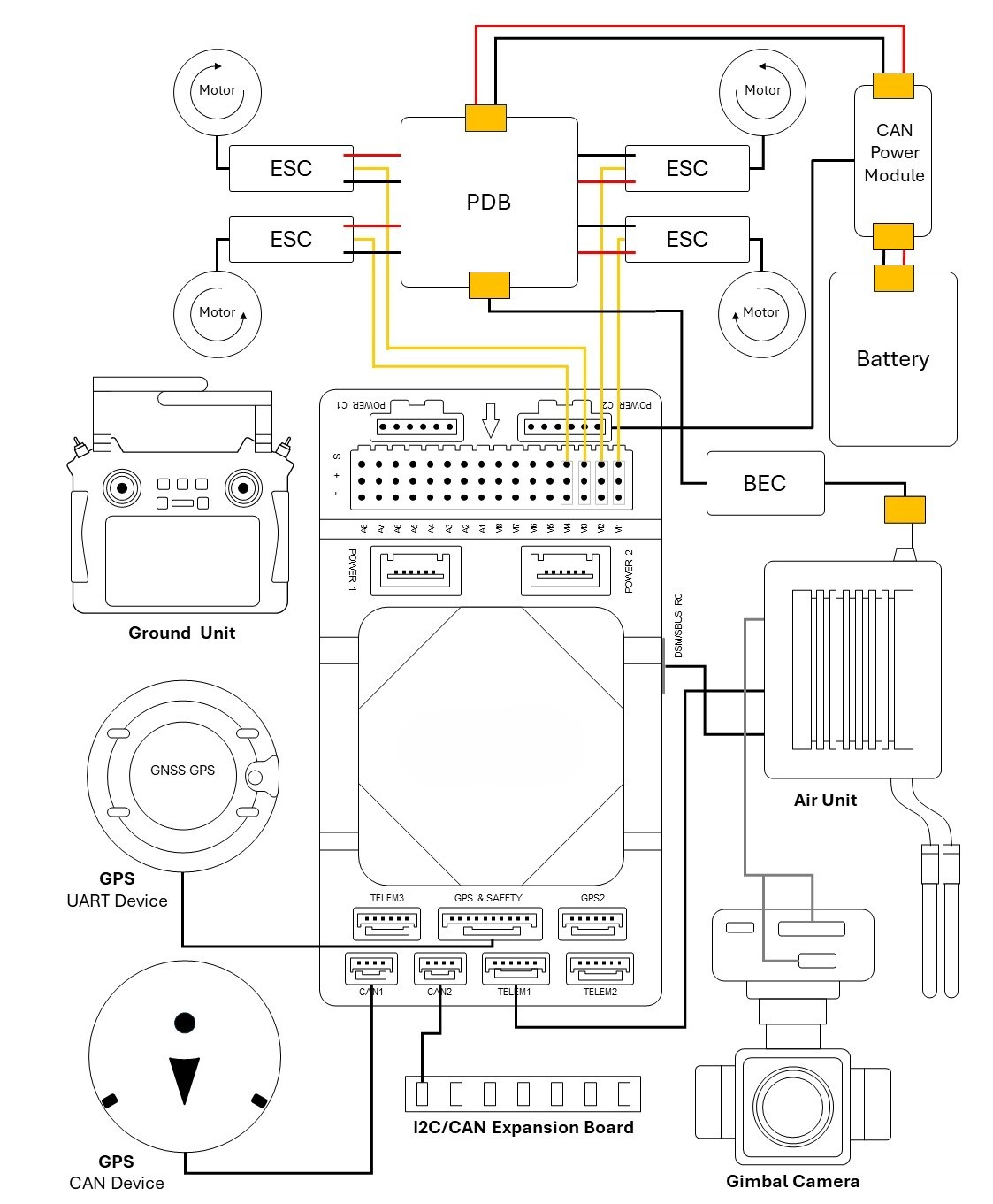
| Interface | Function / Description |
|---|---|
| POWER C1 | Connect CAN PMU to POWER C1. Used with UAVCAN power modules. |
| POWER C2 | Connect CAN PMU to POWER C2. Used with UAVCAN power modules. |
| POWER 1 | Connect to an SMBus (I2C) power module. |
| POWER 2 | Connect to an SMBus (I2C) power module. |
| GPS & SAFETY | Connect to a primary GPS module (integrates GPS, safety switch, and buzzer). |
| GPS2 | Connect to a secondary GPS / RTK module. |
| UART4 | Available for user customization. |
| TELEM1 / 2 / 3 | Connect to telemetry transceivers or MAVLink companion devices. |
| MicroSD CARD | Insert a MicroSD card for flight logging and mission data storage. |
| A1–A8 | Configurable PWM / GPIO. Outputs A1–A6 support DShot and bidirectional DShot (Bdshot); connects camera shutter, hot shoe, servos, etc. |
| M1–M8 | PWM outputs from the IO coprocessor. Connect to ESCs and servos. |
| USB | Connect to a computer for universal controller communication (e.g., parameter tuning, firmware flashing). |
| CAN1 / CAN2 | Connect to DroneCAN / UAVCAN devices. |
| DSM / SBUS / RSSI | Signal input interface for DSM, SBUS, or RSSI receivers. |
| PPM | Connect to a PPM RC receiver. |
| ETH | Connect to onboard Ethernet network devices. |
| AD&IO | Analog input interface (ADC 3.3V or ADC 6.6V). Typically reserved. |
| FMU Debug | Debug port for developers and advanced diagnostic usage. |
| IO Debug | Debug port for IO coprocessor firmware flashing and diagnostics. |
Serial Port Mapping
| Port Name | ArduPilot Parameter | PX4 Device Path | Default Assigned Function | Hardware Features |
|---|---|---|---|---|
| USART1 | SERIAL3 | /dev/ttyS0 | GPS1 | DMA supported |
| USART2 | SERIAL5 | /dev/ttyS1 | TELEM3 | CTS / RTS, DMA supported |
| USART3 | SERIAL7 | /dev/ttyS2 | Debug Console / FMU Debug | No DMA |
| UART4 | SERIAL6 | /dev/ttyS3 | UART4 | No DMA |
| UART5 | SERIAL2 | /dev/ttyS4 | TELEM2 | CTS / RTS, DMA supported |
| USART6 | (N/A) | /dev/ttyS5 | PX4IO / RC | |
| UART7 | SERIAL1 | /dev/ttyS6 | TELEM1 | CTS / RTS, DMA supported |
| UART8 | SERIAL4 | /dev/ttyS7 | GPS2 | DMA supported |
| USB | SERIAL8 | /dev/ttyACM0 | OTG2 (USB) | DMA supported |
Power Consumption
Operating Voltage
| Parameter | Minimum | Typical | Maximum |
|---|---|---|---|
| Input Voltage | 4.6 V | 5.0 V | 5.4 V |
Current Consumption
| Operating State | Typical | Maximum |
|---|---|---|
| Flight Controller + Connected Peripherals | 3.0 A | 3.44 A |
| Flight Controller Only | 0.44 A | 0.58 A |
Quick Start
This guide provides instructions on powering the universal flight controller and connecting its essential peripherals.
For complete flight software documentation and flight modes, refer to:
Vehicle Orientation
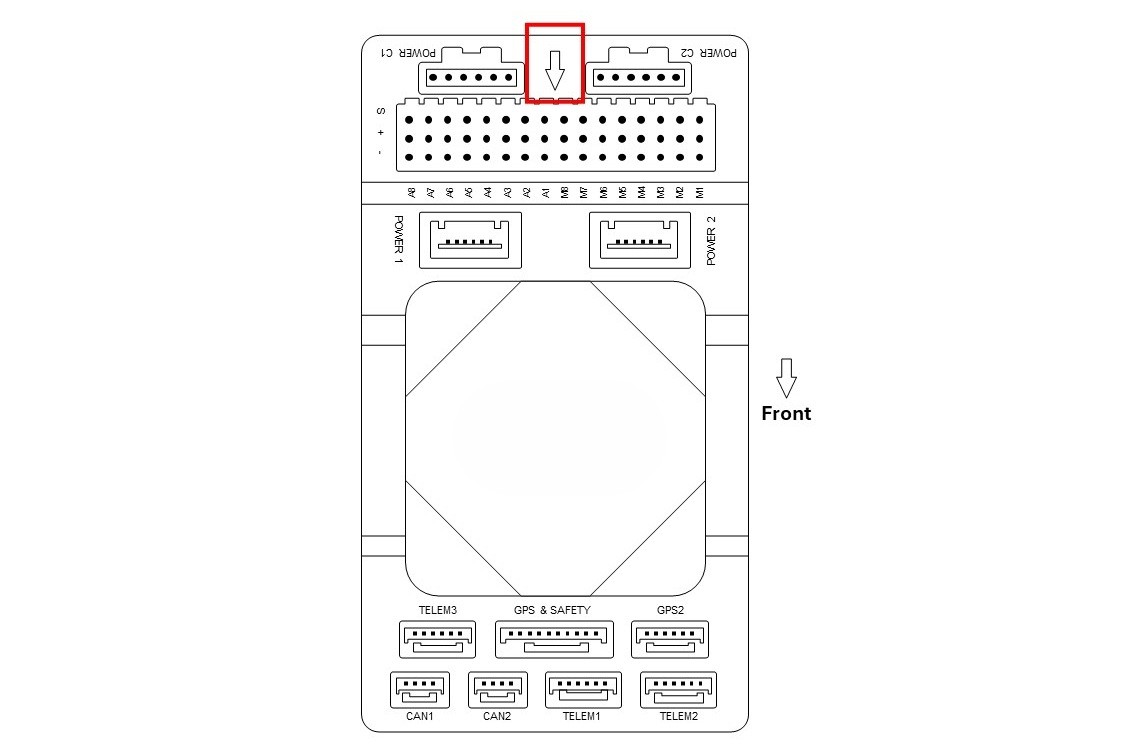
If the flight controller cannot be mounted in the default forward-facing orientation due to airframe layout, configure the flight controller orientation parameters in the ground control software (GCS) accordingly.
Firmware Support
The flight controller is fully supported by both ArduPilot and PX4 autopilot firmware.
- ArduPilot:
- PX4 Autopilot:
Loading Firmware via Mission Planner
Loading firmware through Mission Planner is recommended:
- Download and install Mission Planner.
- Connect the flight controller to your computer using a USB Type-C cable.
- Open Mission Planner, navigate to INITIAL SETUP > Install Firmware, and select the desired firmware image file.
Peripheral Connections
GPS & Compass Module
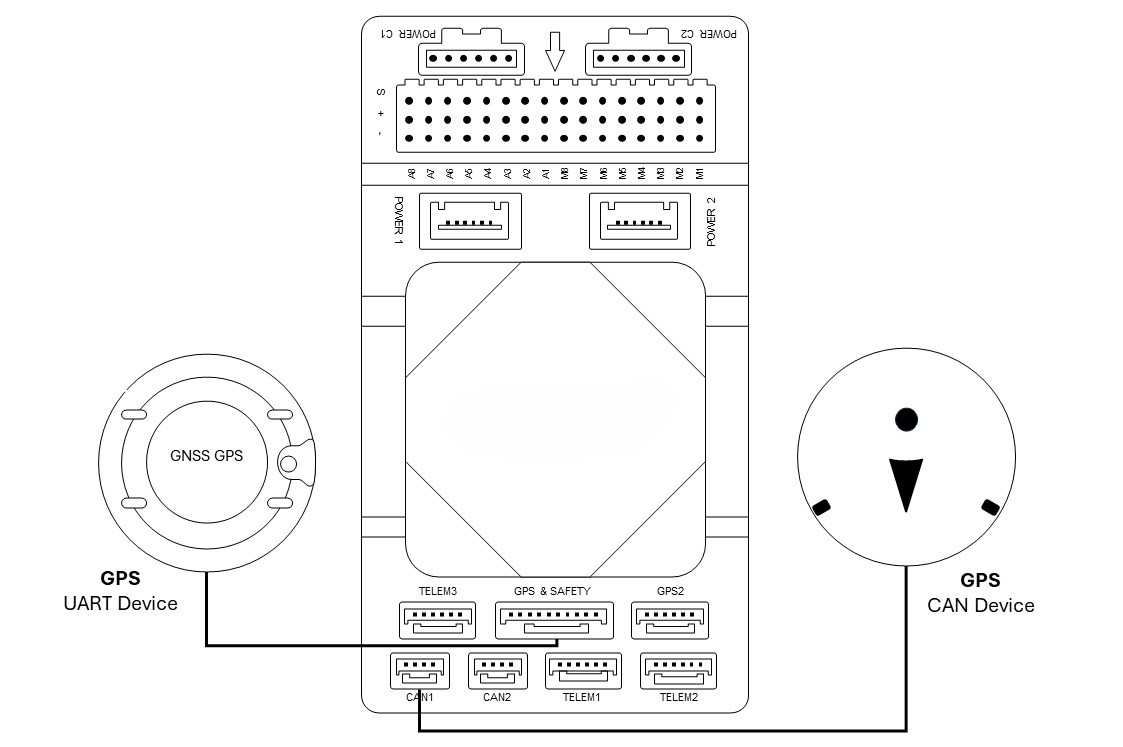
- Connect your GPS/RTK module to the GPS & SAFETY or GPS2 port.
- The primary GPS module typically includes an internal compass, safety switch, buzzer, and RGB LED indicator.
- Ensure the module is mounted away from high-current power lines and motors, with the arrow pointing toward the vehicle front.
- Although the flight controller features an integrated RM3100 geomagnetic sensor, internal high-current power distribution can cause electromagnetic interference. It is recommended to use the external compass on the GPS module (connected via I2C or DroneCAN) as the primary navigation compass.
- DroneCAN / UAVCAN GNSS modules can be connected to the CAN1 or CAN2 bus.
Radio Control & Telemetry System
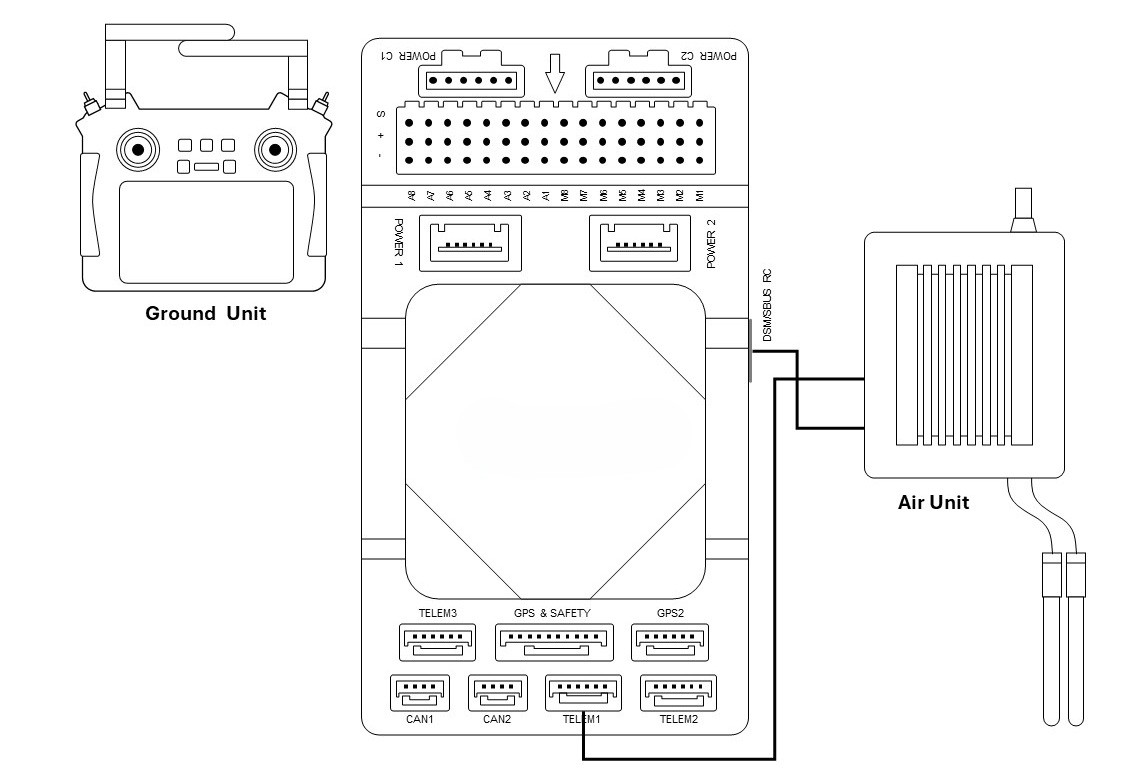
- Telemetry: Connect the air telemetry transceiver to TELEM1, TELEM2, or TELEM3 to establish ground control station (GCS) communication.
- Unidirectional RC Receivers: Supported protocols include PPM, DSM, and SBUS. Connect DSM or SBUS receivers to the DSM/SBUS interface (dedicated 3.3 V and 5 V power pins are provided respectively). If using a PPM receiver, connect it to the PPM interface.
- Bi-directional RC Protocols: If using bidirectional telemetry protocols such as CRSF (Crossfire / ELRS) or FPort, connect to the TX pin of any DMA-capable UART port and set the parameter
SERIALx_PROTOCOL = 23in the autopilot firmware.
Power Module (PMU)
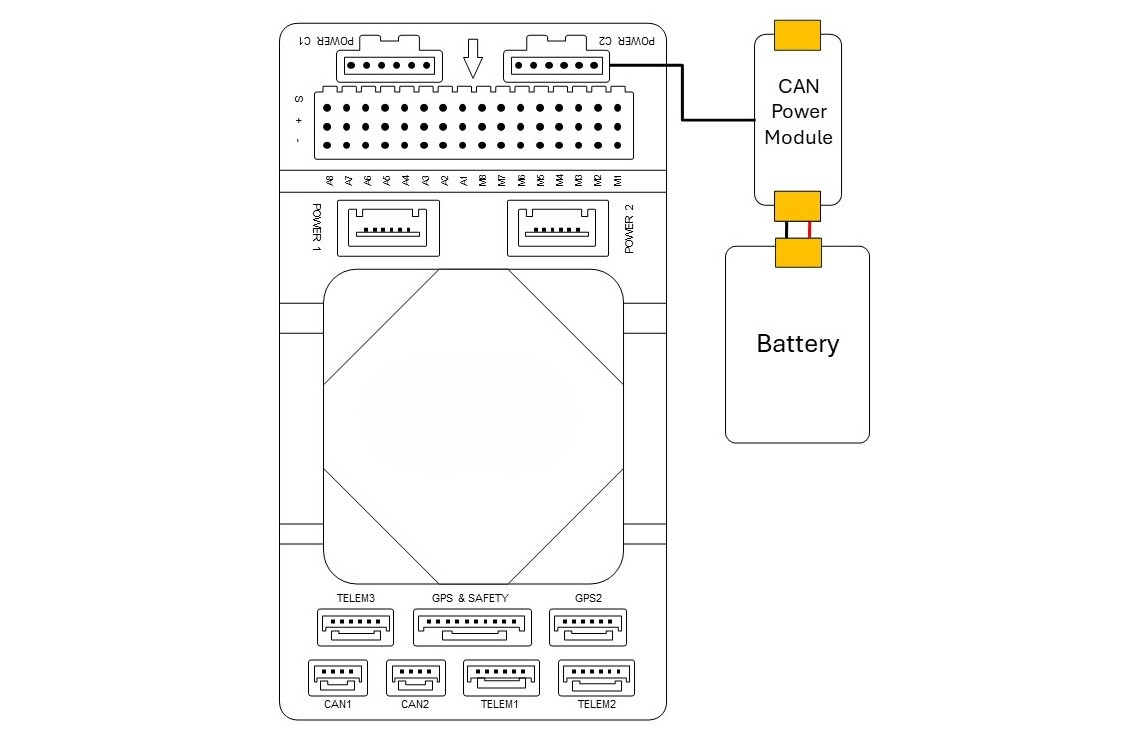
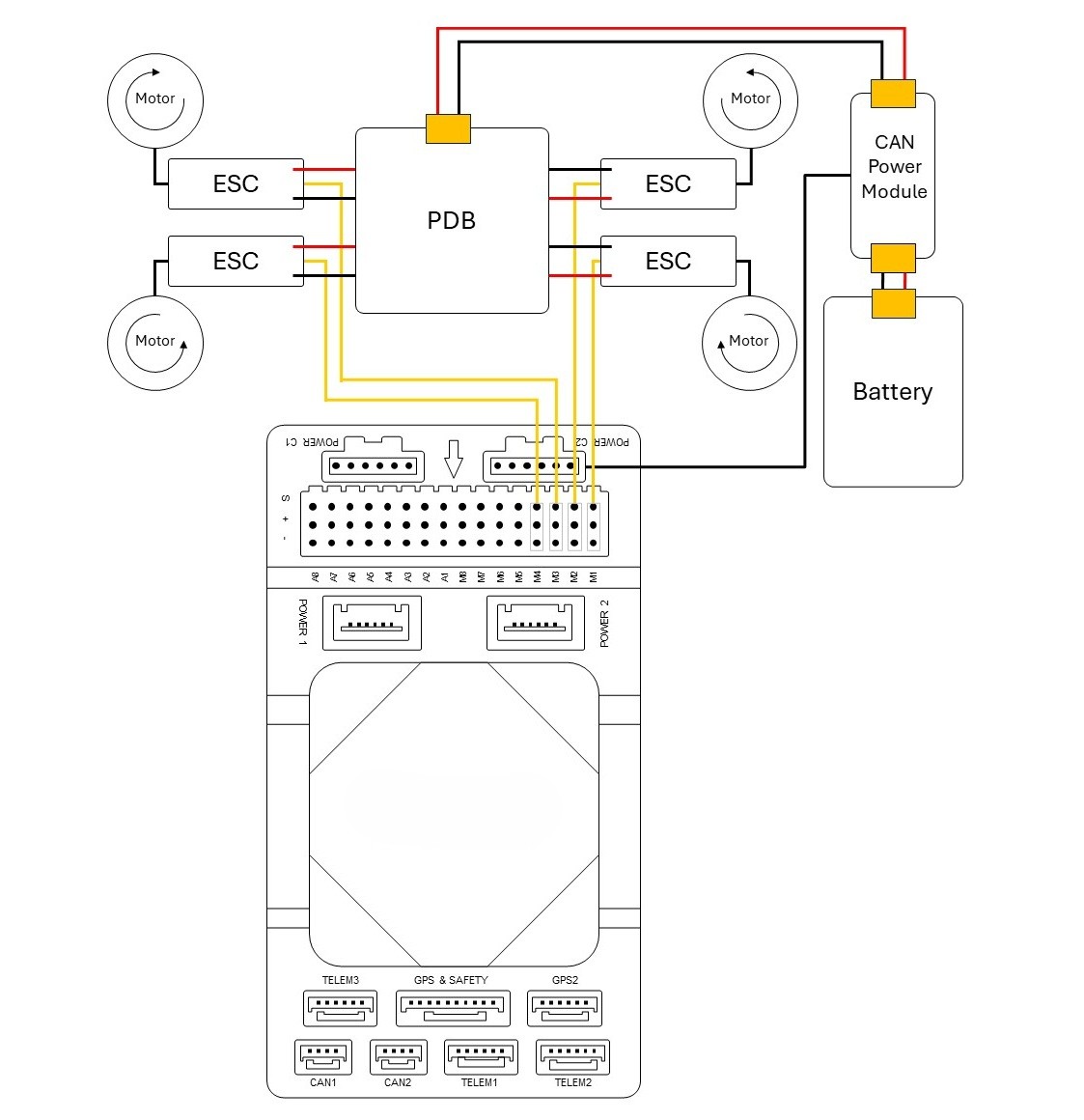
- Connect a compatible CAN PMU module (supporting 3S–14S LiPo batteries) to Power C1 or Power C2 via the 6-pin connector.
- Analog and I2C power modules are also supported via the Power 1 and Power 2 ports.
- ArduPilot DroneCAN Battery Monitor Parameters:
When using a DroneCAN PMU, the default ArduPilot parameter settings are:
BATT_MONITOR = 8(DroneCAN battery monitor)CAN_P1_DRIVER = 1CAN_P2_DRIVER = 1CAN_D1_PROTOCOL = 1CAN_D2_PROTOCOL = 1
- Under PX4, configure the DroneCAN PMU driver as required.
MicroSD Card
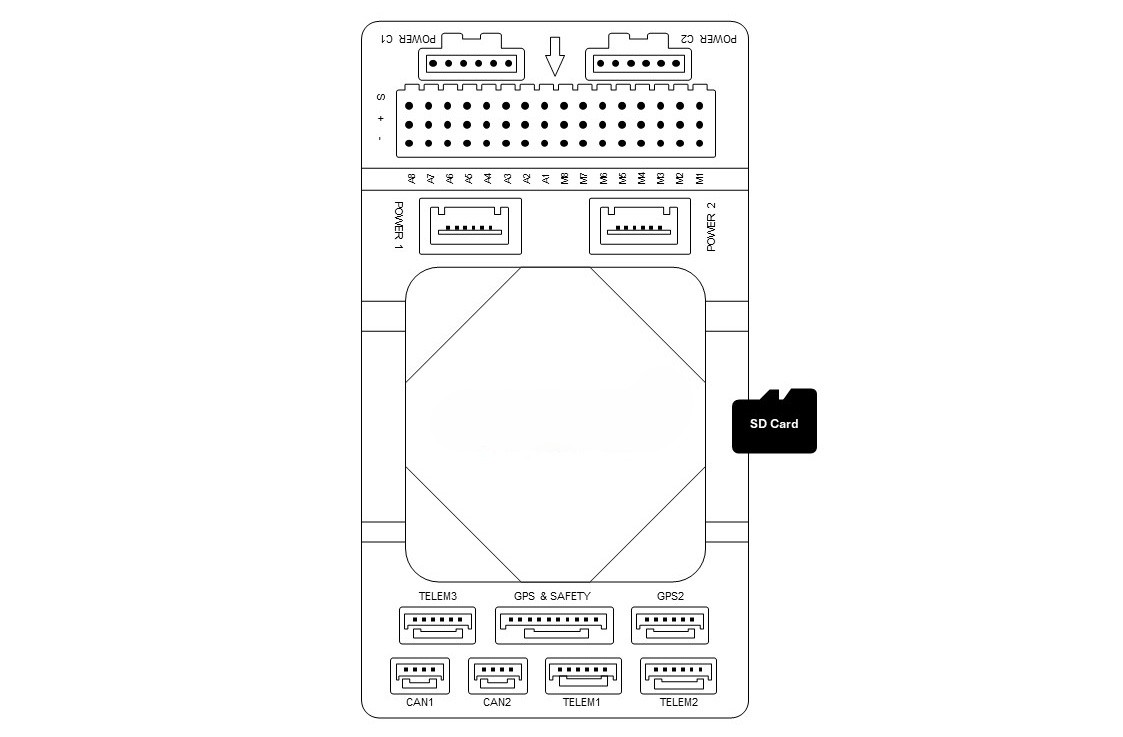
- Insert a MicroSD card into the slot before flight. High-rate flight logs and IMU analysis data require storage on the MicroSD card.
Motor & Servo Connections
- Connect ESCs and servos to the M1–M8 and A1–A8 headers according to the motor sequence specified for your airframe configuration.
PWM Output & Timer Groups
The flight controller provides 16 PWM outputs in total, including M1–M8 (IO Main PWM) and A1–A8 (FMU PWM):
- All 16 outputs support standard PWM signals.
- DShot Support Limitations: Only FMU PWM A1–A6 support DShot and bidirectional DShot (Bi-Directional DShot). A7 and A8 support standard PWM only.
- FMU Timer Groups: A1–A8 are organized into three hardware timer groups:
- Group 1: A1, A2, A3, A4
- Group 2: A5, A6
- Group 3: A7, A8
Outputs within the same timer group must share the same output protocol (e.g., all DShot or all PWM) and the same refresh frequency.
GPIO Pin Mapping
All 8 IO outputs (M1–M8) and 8 FMU PWM outputs (A1–A8) can be configured as GPIOs in the autopilot (e.g., for relays, buttons, or RPM sensors). When configuring servo outputs as GPIO, use the following pin numbers:
| Interface | GPIO Pin # | Interface | GPIO Pin # |
|---|---|---|---|
| M1 | 101 | A1 | 50 |
| M2 | 102 | A2 | 51 |
| M3 | 103 | A3 | 52 |
| M4 | 104 | A4 | 53 |
| M5 | 105 | A5 | 54 |
| M6 | 106 | A6 | 55 |
| M7 | 107 | A7 | 56 |
| M8 | 108 | A8 | 57 |
| FMU_CAP1 | 58 | NFC_GPIO | 60 |
Servo Rail Power Supply
The flight controller internal regulator does not supply power to the servo rail (+ pins on M1–M8 and A1–A8). An external BEC or dedicated power supply must be connected to the positive and negative rails of the servo headers to power any servos.
Useful Links
- ArduPilot Documentation:
- PX4 Autopilot Documentation: