DO
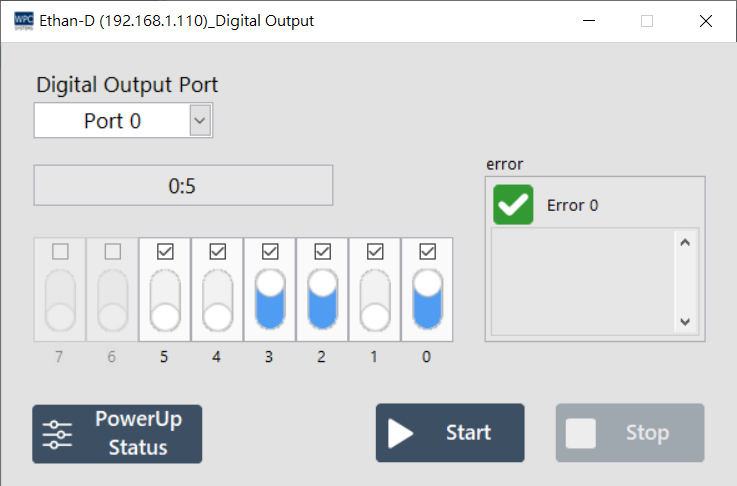
The DO (Digital Output) panel allows users to control the status of digital output signals. Through this interface, you can manually toggle the high and low potential outputs of each channel and set the initial power-up state.
Supported Products and Ports
This function supports devices equipped with Digital Output (DO). Please confirm the corresponding port (Port) number according to your device model:
| Product Name | Port |
|---|---|
Ethan-D | 1 |
Ethan-EX-D | 2, 3 |
USB-DAQ-F1-AD | 0~3 |
USB-DAQ-F1-AOD | 0~3 |
USB-DAQ-F1-CD | 0~3 |
USB-DAQ-F1-D | 0~3 |
USB-DAQ-F1-DSNK | 0~3 |
USB-DAQ-F1-RD | 0~3 |
USB-DAQ-F1-TD | 0~3 |
Operation Description
You can click the switch icon on the screen to toggle the output status and use the buttons below for global control:
| Button | Function |
|---|---|
| Start | Enable DO control function, allowing status changes. |
| Stop | Disable DO control function. |
| Power-Up state | Open the "Power-Up State Settings" window. |
Power-Up State Settings
This function allows you to set the default initial state (High or Low) for each DO channel when the device powers up or reboots. This setting is written to the device's non-volatile memory.
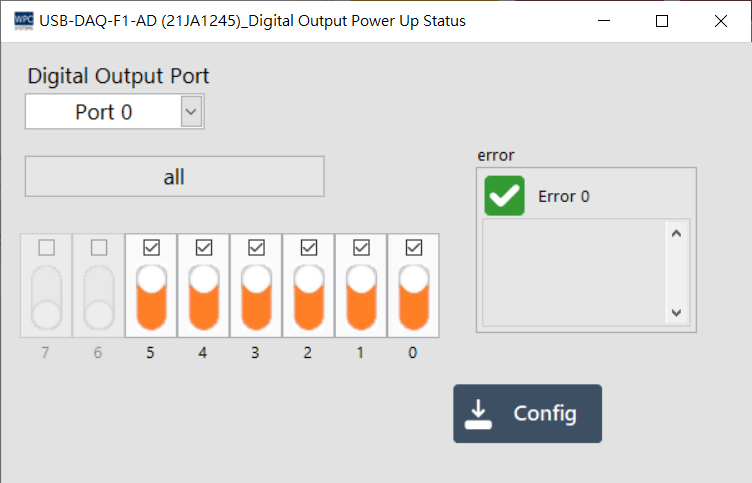
- Click the Power-Up state button to open the settings window.
- Toggle the switches for each channel to your desired initial state.
- Press the Set button to write the settings to the device.
| Button | Function |
|---|---|
| Set | Write the current switch configuration to the device as the power-up initial state. |