I2C
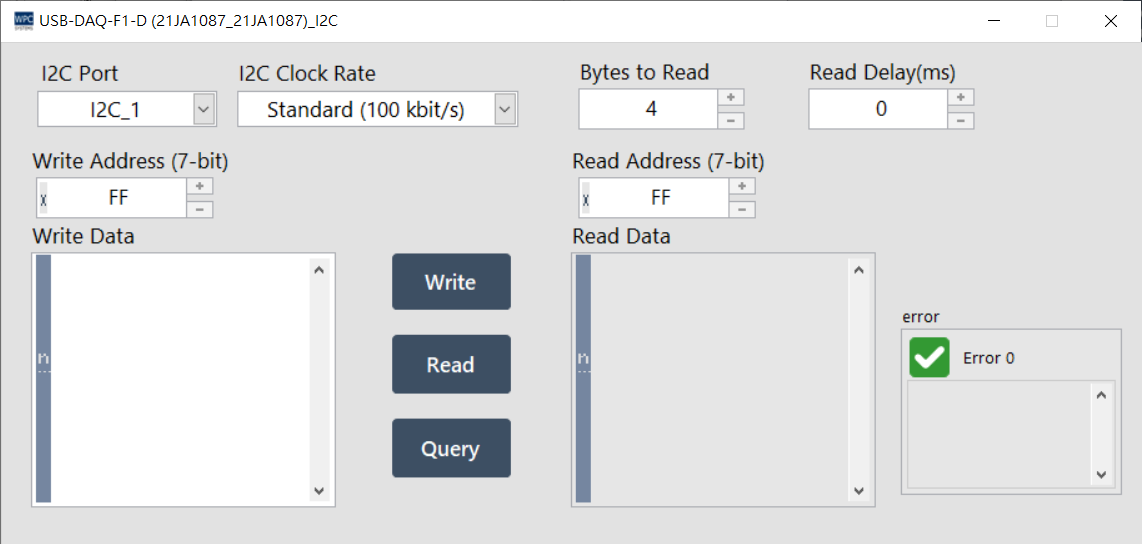
The I2C (Inter-Integrated Circuit) panel provides users with I2C protocol testing. You can set the clock rate and perform read, write, and query operations on slave devices.
Supported Products and Ports
This function supports devices equipped with an I2C interface. Please confirm the corresponding port (Port) number according to your device model:
| Product Name | Port |
|---|---|
USB-DAQ-F1-AD | 1~2 |
USB-DAQ-F1-AOD | 1~2 |
USB-DAQ-F1-CD | 1~2 |
USB-DAQ-F1-D | 1~2 |
USB-DAQ-F1-RD | 1~2 |
USB-DAQ-F1-TD | 1~2 |
Parameter Settings
I2C Clock Rate
Four standard transmission rates are supported. Please select according to your hardware requirements:
- Standard: 100 kbit/s
- Fast: 400 kbit/s
- Fast Plus: 1 Mbit/s
- High Speed: 3.4 Mbit/s
Operation Description
Use the control buttons below to execute specific I2C commands:
| Button | Function |
|---|---|
| Write Address | Set the target I2C slave address (Slave Address). |
| Write | Write data to the slave device at the specified address. |
| Read Address | Set the slave device address to be read. |
| Read | Read data from the slave device. |
| Query | Execute a composite operation: write a command first, then read the response data (Repeated Start). |
| Bytes to Read | Specify the length of data to be read (Byte). |
| Read Delay | Set the waiting time (milliseconds) after the read command is sent, which is the timing interval. |