UART
The UART (Universal Asynchronous Receiver/Transmitter) panel provides users with asynchronous serial communication testing. You can set parameters such as baud rate and parity check to perform data transmission and reception.
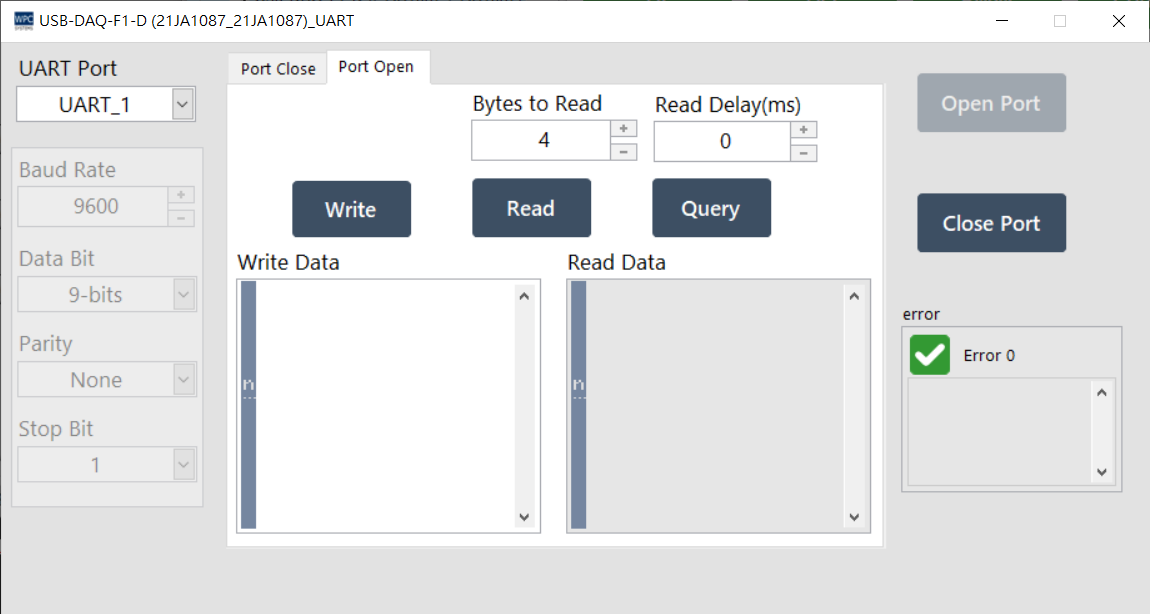
Supported Products and Ports
This function supports devices equipped with a UART interface. Please confirm the corresponding port (Port) number according to your device model:
| Product Name | Port |
|---|---|
USB-DAQ-F1-AD | 1~2 |
USB-DAQ-F1-AOD | 1~2 |
USB-DAQ-F1-CD | 1~2 |
USB-DAQ-F1-D | 1~2 |
USB-DAQ-F1-RD | 1~2 |
USB-DAQ-F1-TD | 1~2 |
Parameter Settings
Before opening the port, please set the communication protocol parameters:
| Parameter | Description |
|---|---|
| Baud Rate | Transmission rate (bits per second), such as 9600, 115200. |
| Data Bit | Data bit length, usually 8 bits. |
| Parity | Parity check bit (None, Odd, Even), used for error detection. |
| Stop Bit | Stop bit length (1, 1.5, 2), used to mark the end of the data frame. |
Operation Description
| Button | Function |
|---|---|
| Open Port | Open the UART port according to the setting parameters. |
| Close Port | Close the UART port. |
| Write | Send the string in the input box. |
| Read | Read the data in the receive buffer. |
| Query | Query mode: automatically wait and read back data after sending a command. |
| Bytes to Read | Specify the number of bytes to read in read mode. |
| Read Delay | Delay waiting time before reading (milliseconds). |