Main Screen Introduction
Main Screen Function Description
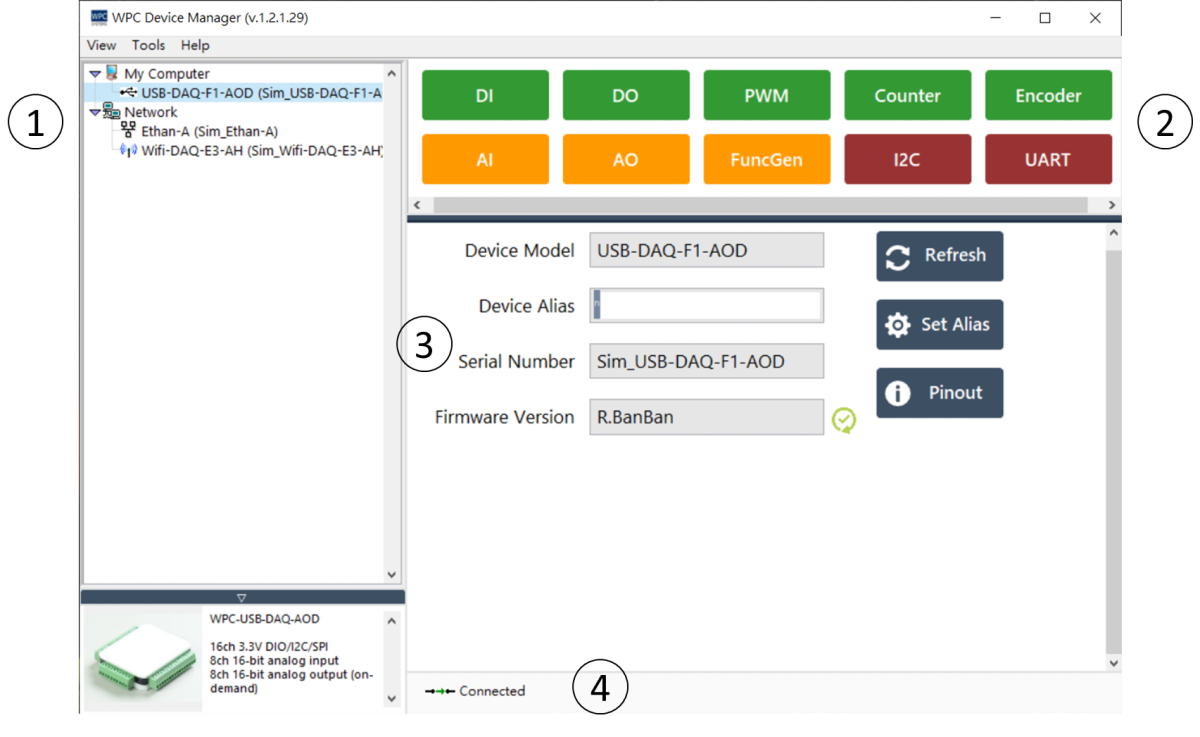
-
Device List DAQ devices are categorized into two main groups based on their connection interface: Network Devices and My Computer.
- Network Devices: Lists Ethan DAQ, WIFI DAQ, STEM, and EMotion products.
- My Computer: Lists USB series products.
-
Test Panel The system dynamically displays corresponding test function buttons based on the selected device model.
-
Product Information Displays detailed specification information of the device, including serial number, IP address, MAC address, and firmware version. Users can also configure parameters or view the pinout diagram (Pinout) in this area.
info
- ⚠️ Icon: Indicates that the current firmware version is outdated.
- ✅ Icon: Indicates that the current firmware is up to date.
- Specifications and Status
Displays hardware specifications and real-time connection status of the device.
- Connected: The device is connected.
- Disconnected: The device is not connected.
- IP Conflict: Detected an IP address conflict.