Function Generator
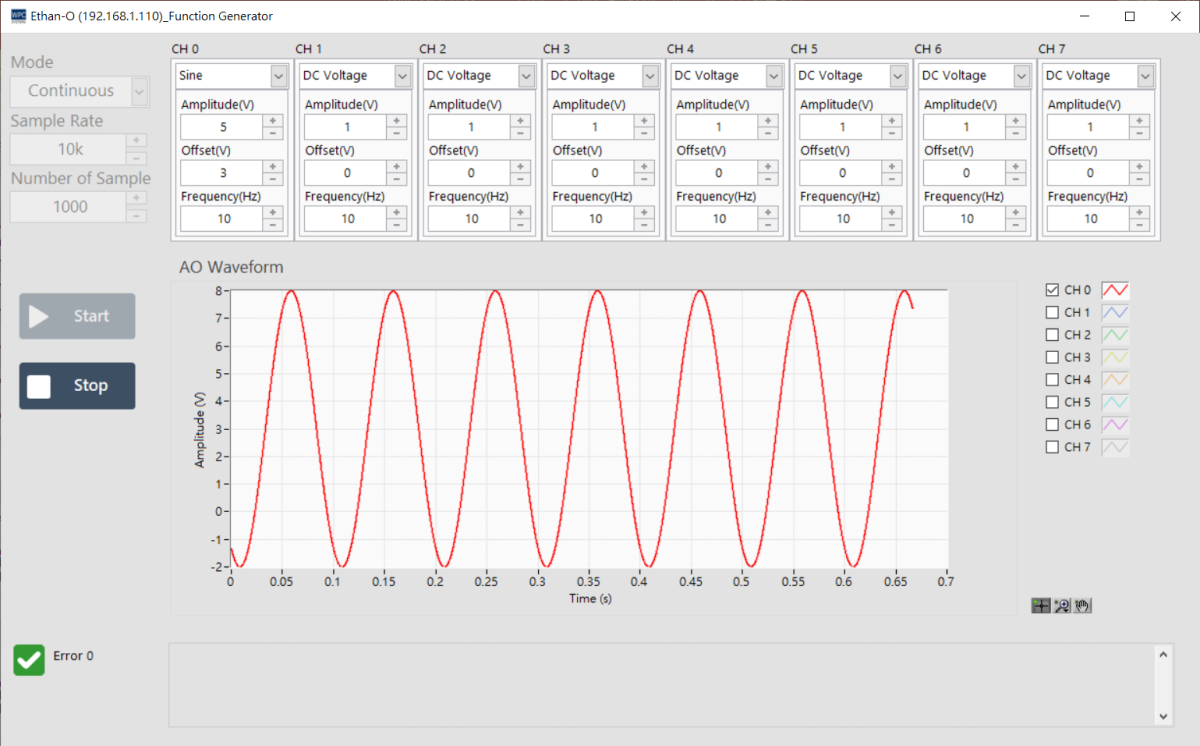
The Function Generator panel allows users to generate various standard waveform signals through analog output channels.
Supported Products
This function requires a high-performance DAQ device equipped with Analog Output (AO):
| Product Name | Description |
|---|---|
Ethan-O | 8-channel (+/-10V) analog voltage output |
Function Settings
1. Output Mode (Mode)
Select the waveform output behavior mode:
| Mode | Description |
|---|---|
| N Sample | Finite point output. Automatically stops after generating the specified number of waveform points. |
| Continuous | Continuous output. The waveform will continue to cycle through output until Stop is pressed. |
2. Waveform Type
The following standard waveforms are supported:
- DC Voltage: DC voltage output.
- Rectangular: Square wave.
- Triangular: Triangle wave.
- Sine: Sine wave.
3. Parameter Settings
Adjust the detailed parameters of the waveform. Please note that the output voltage must comply with the hardware specification limits (+/-10V).
| Parameter | Description |
|---|---|
| Sampling Rate | Set the sampling rate (maximum supported 10k S/s). |
| Frequency | Set the waveform frequency. Please follow the Nyquist Theorem to set an appropriate sampling rate to avoid distortion. |
| Amplitude (V) | Waveform amplitude (Peak value). |
| Offset (V) | DC offset. Constraints: • Offset + Amplitude ≤ +10V • Offset - Amplitude ≥ -10V |
Operation Description
| Button | Function |
|---|---|
| Start | Start generating and outputting waveform signals. |
| Stop | Stop output. |