Motion
The Motion (Motion Control) panel provides a complete test environment for axis control functions. You can monitor axis card status in real-time, configure I/O parameters, perform Find Reference (Home), and directly issue motion commands to control motors.
In addition, the panel supports saving the current settings as a configuration file (*.INI), making it convenient for fast loading during subsequent program development.
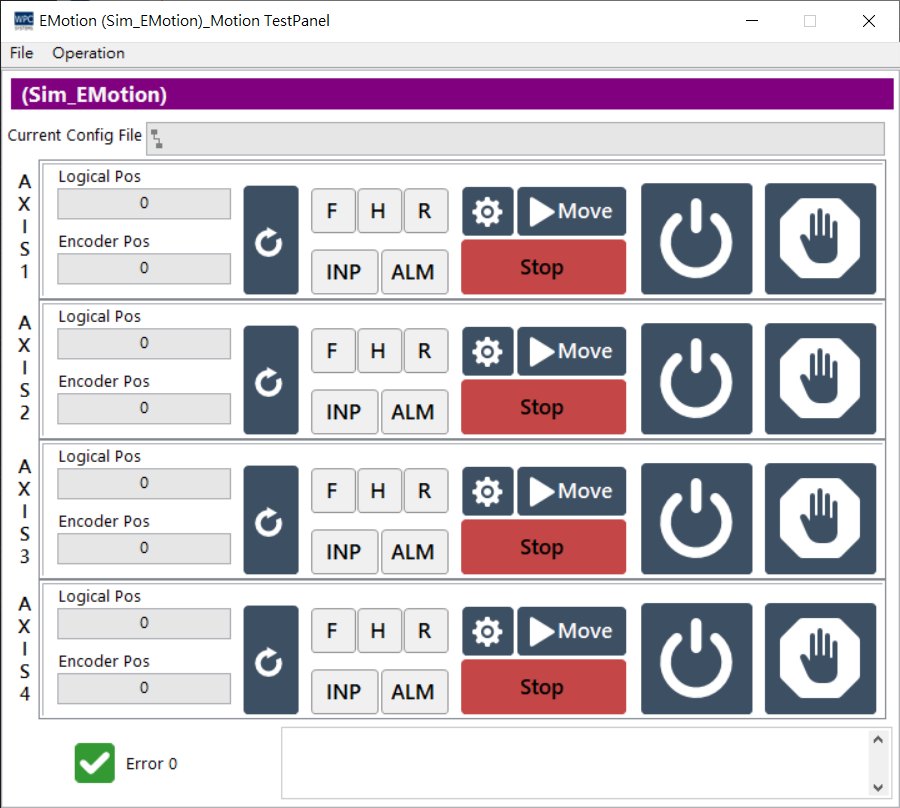
Status Monitor
The upper area of the panel displays real-time status information for each axis:
| Status Indicator/Value | Description |
|---|---|
| Logical Pos | Logical position (the cumulative pulse position output by the axis card). |
| Encoder Pos | The actual position feedback from the Encoder. |
| F | Forward Limit switch trigger status. |
| R | Reverse Limit switch trigger status. |
| H | Home switch trigger status. |
| INP | In-Position signal, indicating whether the motor has reached the target position. |
| ALM | Alarm signal, indicating whether the driver has an error. |
| Stop (Red)/Start (Green) | motor operation status indicator. |
Function Toolbar
| Icon | Function Description |
|---|---|
 | Open Configuration Panel: Opens the motion control I/O setting panel. |
 | Servo On/Off: Toggles the servo excitation status. |
 | Halt: Emergency pause of motor operation. |
 | Interactive Control: Opens the interactive move control panel. |
 | Reset Position: Resets the logical position count to 0. |
Configuration Panel (Configuration)
After clicking the settings icon, detailed configuration can be made for the axis card I/O behavior:
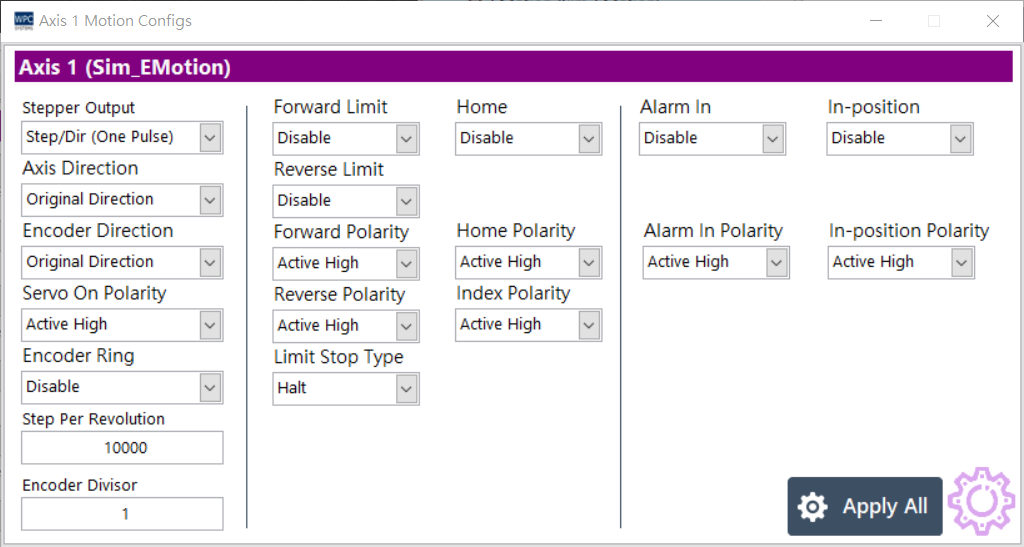
| Parameter Setting | Options | Description |
|---|---|---|
| Stepper Output | Step/Dir (1P)CW/CCW (2P) | Set pulse output mode: single-pulse or dual-pulse. |
| Axis Direction | OriginalInverse | Set motor rotation direction. |
| Encoder Direction | OriginalInverse | Set encoder count direction. |
| Servo On Polarity | Active LowActive High | Set the polarity of the Servo On signal. |
| Encoder Ring | DisableEnable | Enable or disable ring count mode. |
| Step Per Revolution | (Value) | Set the number of pulses required for one motor revolution. |
| Encoder Divisor | (Value) | Set the encoder frequency division ratio. |
| Limit Protection | DisableEnable | Enable Forward/Reverse limit protection separately. |
| Signal Polarity | Active LowActive High | Set the polarity of signals such as Forward, Reverse, Home, Index, Alarm, and In-position. |
| Limit Stop Type | DecelerateHalt | Set the stop method when limit is triggered (decelerate stop or immediate halt). |
| Apply All | (Button) | Apply current settings to all axes. |
Interactive Control and Testing
1. Simple Move
Provides basic PTP (Point-to-Point) move testing functionality.
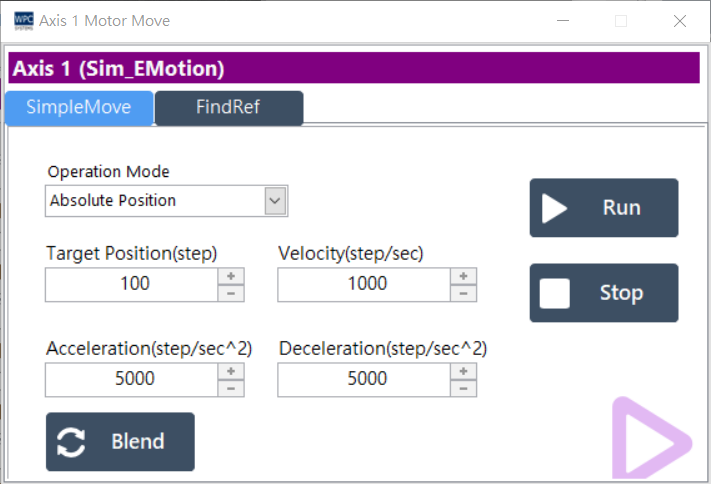
| Parameter | Description |
|---|---|
| Operation Mode | Move mode selection: • Absolute: Absolute move • Relative: Relative move • Velocity: Velocity mode (continuous operation) |
| Target Position | Set target position (Step). |
| Velocity | Set running speed (Step/sec). |
| Accel / Decel | Set acceleration and deceleration (Step/sec²). |
| Blend | Used to update target position or velocity in real-time during operation. |
| Run / Stop | Start or stop motor operation. |
2. Find Reference
Perform automatic home-finding procedure.
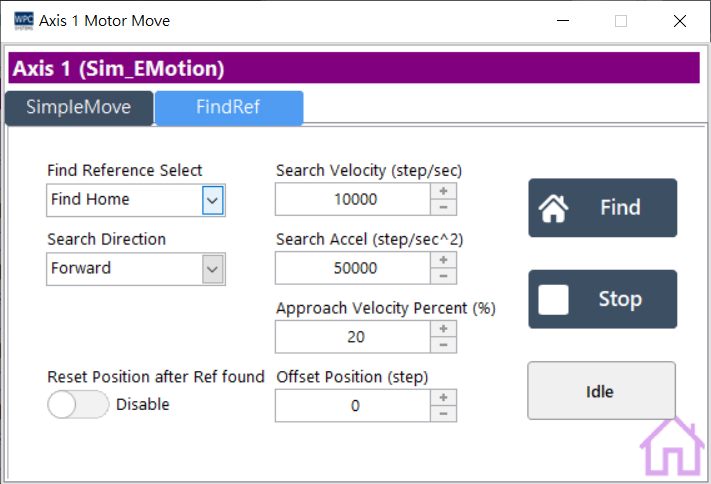
| Parameter | Description |
|---|---|
| Target Mode | Select reference point type: Home, Forward Limit, Reverse Limit, or Index. |
| Search Direction | Set the initial search direction. |
| Velocity Profile | Set search velocity, acceleration, and approach velocity (Approach Velocity). |
| Offset Position | Offset movement amount after the reference point is found. |
| Reset Position | Whether to reset the position to zero after finding. |
| Find / Stop | Execute or stop the find reference action. |
| State | Display current status: Idle, Finding, Found. |